Reseller / Partner guide
For partners who resell NexBasira to their own customers. You get a dedicated Partner console (a PARTNER badge appears in the header) where you onboard client organizations, track what you earn, manage your team, and open any client's account to help them.
Enter it from the ← Partner console link in the top bar.
Contents
- The partner dashboard
- Your organizations
- Opening a client's console
- Team & roles
- Commissions & payouts
1. The partner dashboard
The Overview page is your at-a-glance business: how many organizations you manage, commission earned, what's unpaid, and your economics for the period.
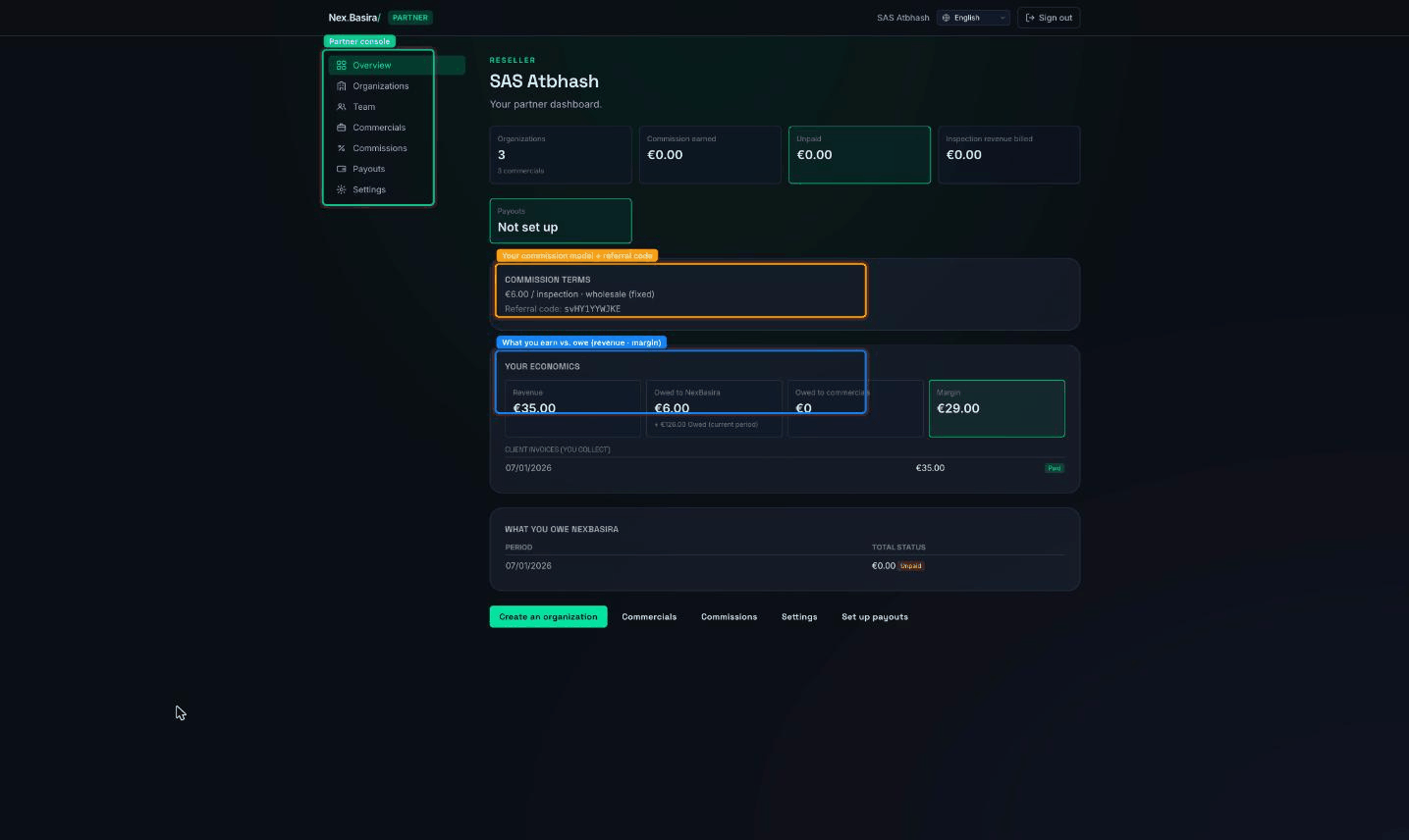
- Tiles — organizations, commission earned, unpaid, inspection revenue billed, and payout status.
- Commission terms — your model and rate (e.g. €6.00 / inspection · wholesale (fixed)) plus your referral code.
- Your economics — Revenue (what you invoice clients), Owed to NexBasira, Owed to commercials, and your Margin. Below it, Client invoices (you collect) and What you owe NexBasira per period.
Two commission models exist: percentage (you earn a cut and NexBasira bills the client) and wholesale/fixed (you buy at a wholesale rate and bill the client yourself). Your terms card tells you which one you're on.
2. Your organizations
The Organizations page is your client book — create and manage the organizations you resell to.
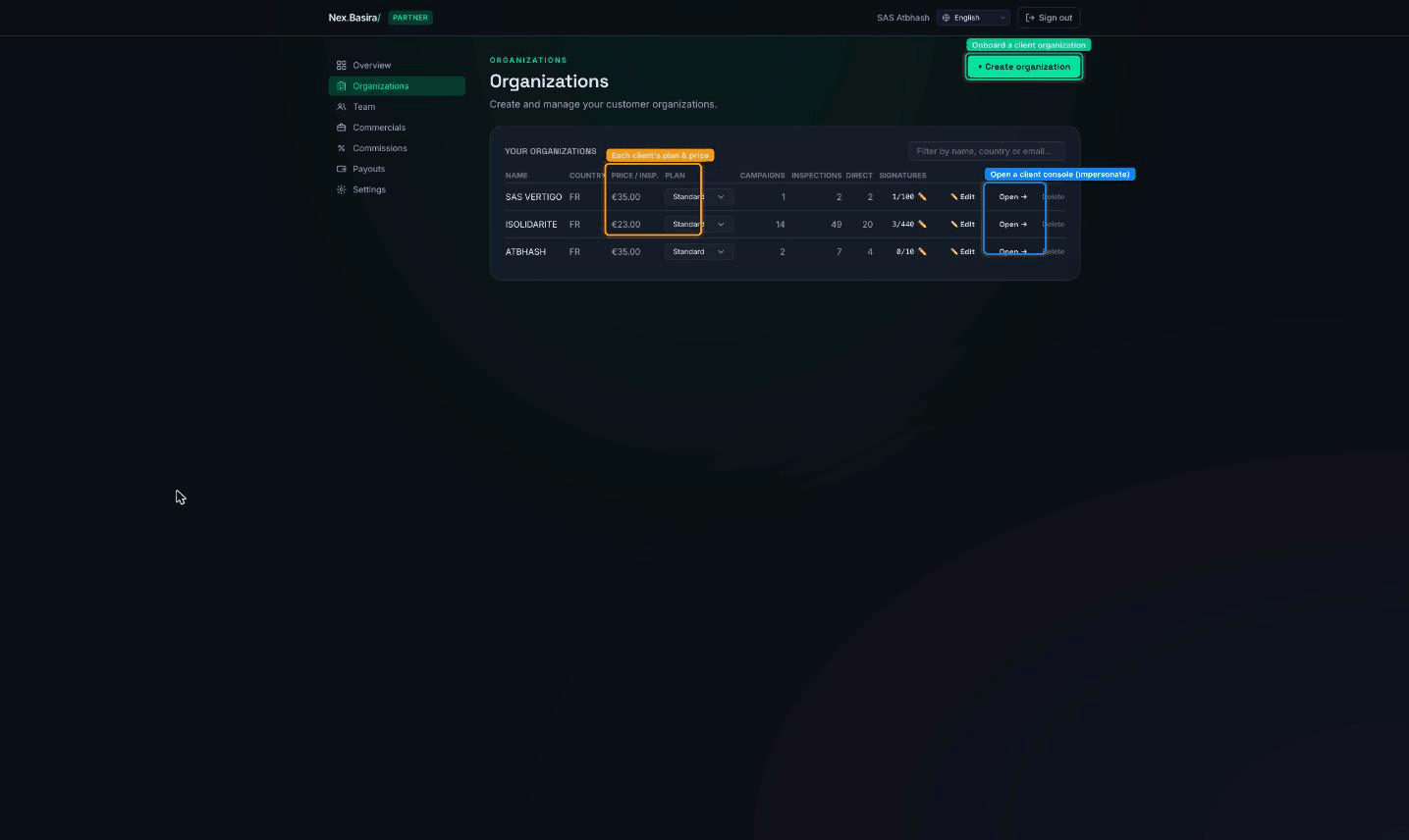
- + Create organization — onboard a new client (name, country, contacts, plan).
- Per row: the client's plan and price / inspection, live campaigns / inspections / direct / signatures counts, and Edit / Open → / Delete.
- Delete ⚠️ soft-deletes the client from your book — it cancels their subscription and stops commission. It's reversible with support, but treat it as "offboard this client".
3. Opening a client's console
Open → on any organization launches that client's own console — you're now working inside their account (impersonation) to set up campaigns, fix something, or give a demo.
- The session is scoped and time-limited, and every action is audit-logged against you, so the client has a clear record.
- Platform-only screens stay blocked while you're impersonating.
- Leave the client console to return to your Partner console.
⚠️ You're acting as the client while their console is open. Anything you change (a campaign, a beneficiary, a message send) is real for them.
4. Team & roles
The Team page lets you invite colleagues into your Partner console with a role that limits what they can do:
- Administrator — full partner access.
- Manager — manage organizations and clients; no billing/payout control.
- Billing — commissions, payouts and invoices only.
Invited team members get an email → set a password → they're in. Every partner endpoint is gated by these roles.
Commercials (on their own page) are your sub-agents/referrers — people who bring you clients and earn a slice; the Overview's Owed to commercials tracks what you owe them.
5. Commissions & payouts
- Commissions — the running detail of what you've earned per client and period, and what NexBasira has billed.
- Payouts — set up how you get paid (shown as Not set up until you configure it). ⚠️ Adding or changing bank/payout details is a sensitive change — do it yourself in the payout setup; support won't enter these for you.
- Settings — your partner profile and defaults.